
Download Flowmotor – Free, Secure Project Management Tool for Small Teams
Overview: Why Flowmotor Stands Out for Tiny Businesses
Flowmotor is a purpose‑built project management application that targets the unique needs of very small businesses, freelancers, and boutique development teams. While the platform can technically support up to 50 users, its design philosophy, pricing structure, and user‑interface simplicity make it most effective for teams of nine or fewer staff members. The core workflow revolves around a single “chief administrator” who creates tasks, assigns them to team members, and monitors progress in real time. Employees log their work directly in the tool, updating status, adding notes, and marking tasks as complete. This creates a transparent production pipeline that is especially valuable for businesses that need to formalize processes without investing in heavyweight enterprise solutions.
One of Flowmotor’s most compelling strengths is its focus on single‑task concentration. The system encourages each staff member to own one task at a time, driving higher completion rates and reducing the context‑switching fatigue that plagues larger, more chaotic project boards. At the same time, the platform is flexible enough to let administrators batch‑assign multiple tasks when the workflow demands it. Whether you are a software developer coordinating a series of code reviews, a small‑scale manufacturer tracking assembly steps, or a creative agency managing client deliverables, Flowmotor provides a clear visual schedule, progress bars, and automated recurring task options that keep the team aligned.
Because the software is positioned as a premium, niche offering, the pricing can feel steep for startups on a shoestring budget. However, the cost is justified by the level of detail in reporting, the ease of automating repeatable tasks, and the ability to export performance metrics for internal audits. In short, Flowmotor delivers a secure, cloud‑based environment where small teams can plan medium‑term projects, monitor real‑time execution, and iterate on processes without the overhead of sprawling task management suites.
Key Features & How to Use Flowmotor (Installation & Daily Workflow)
- Task Scheduler – Drag‑and‑drop calendar with daily, weekly, and monthly views.
- Recurring & Automated Tasks – Set tasks to reset automatically after completion.
- Progress Tracking – Real‑time status bars, time logged, and completion percentages.
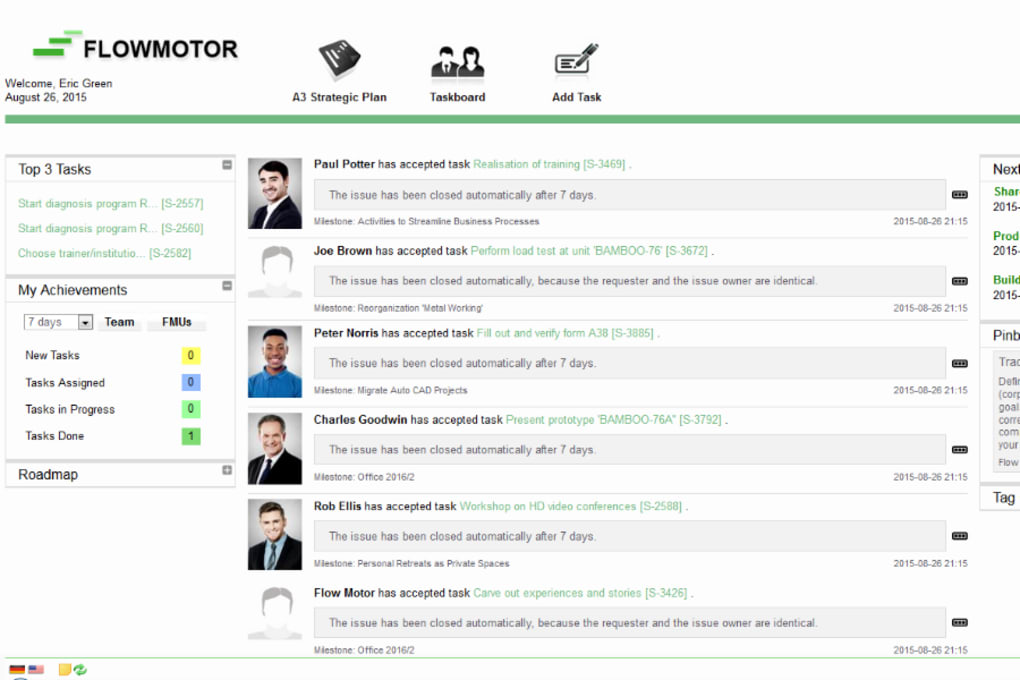
- Team Dashboard – Administrator view of every member’s current workload.
- Performance Reports – Exportable PDF/CSV reports for project health audits.
- Secure Cloud Sync – Encrypted data storage with two‑factor authentication.
- Mobile Companion Apps – Native iOS and Android apps for on‑the‑go updates.
- Integrations – API hooks for popular tools like Slack, GitHub, and QuickBooks.
Installation Steps
Getting started with Flowmotor is straightforward. After you download the installer for your operating system, run the executable (Windows) or the .dmg file (macOS). The wizard guides you through a standard setup: accept the license, choose an installation folder, and optionally enable automatic updates. For mobile users, locate “Flowmotor” in the Apple App Store or Google Play Store, tap “Install,” and sign in with the credentials created during the web‑based registration.
Once installed, the first login opens a quick onboarding tour that explains the dashboard layout, how to create a new project, and how to invite team members. The chief administrator creates a “Workspace,” then adds users by email invitation. Each user receives an activation link, sets a password, and is automatically assigned the “Team Member” role. The administrator can then define custom task categories (e.g., Development, QA, Production) and set default due‑date rules.
Daily Workflow
On a typical day, the administrator opens the “Task Scheduler,” clicks “Create New Task,” fills in a concise title, description, expected duration, and selects an assignee. The task can be marked as “One‑time” or “Recurring,” and an automation rule can be attached—such as resetting the task after a status change to “Completed.” Team members receive push notifications on their desktop or mobile device, log in, and update the task status (e.g., In Progress, Blocked, Done). All changes are timestamped, and the dashboard instantly reflects the new percentages, allowing the administrator to spot bottlenecks before they become critical.
Compatibility & System Requirements
Flowmotor is a cross‑platform solution designed to run on the most common desktop and mobile operating systems. The web application works in modern browsers including Chrome, Firefox, Edge, and Safari. Native clients are available for:
- Windows 10 and later (64‑bit)
- macOS 11 (Big Sur) and later
- iOS 13+ (iPhone & iPad)
- Android 8.0+ (smartphones & tablets)
The desktop client requires at least 4 GB of RAM and 200 MB of free disk space. Mobile apps need a minimum of 150 MB of storage. All data is stored securely in the cloud, so there is no need for local databases or server maintenance. Updates are delivered automatically via the cloud, ensuring every user works with the latest features and security patches without manual intervention.
Pros & Cons – An Honest Assessment
Pros
- Focused Simplicity: The single‑task concentration model reduces overload and improves completion rates.
- Automation Capabilities: Recurring tasks and auto‑reset rules save time for repetitive workflows.
- Robust Reporting: Exportable performance metrics help small businesses justify process improvements.
- Secure Cloud Architecture: End‑to‑end encryption and 2FA keep data safe.
- Mobile Access: Native iOS and Android apps keep the team synced on the go.
Cons
- Price Point: The subscription is relatively high for micro‑businesses, especially when compared to free alternatives.
- Scalability Limits: The UI becomes cluttered beyond roughly 20 concurrent tasks, making larger teams uncomfortable.
- Learning Curve for Admins: Setting up automation rules requires a brief period of familiarization.
- Limited Custom Fields: Users cannot add unlimited custom metadata to tasks.
- No Free Tier: A trial period is available, but there is no permanent free version.
Frequently Asked Questions
Can I use Flowmotor for remote teams?
Absolutely. Because all data is stored in the cloud and accessed via a secure web portal, remote collaborators can log in from any device with an internet connection. The mobile apps further simplify remote updates.
Is there a way to integrate Flowmotor with Slack?
Yes. Flowmotor offers an API hook that can post task updates directly to a designated Slack channel. This keeps everyone informed without leaving their communication hub.
How secure is my project data?
All data is encrypted in transit (TLS 1.3) and at rest (AES‑256). Two‑factor authentication is mandatory for admin accounts, and regular security audits are performed by a third‑party firm.
Can I export my task history?
Yes. Flowmotor provides CSV and PDF export options for both individual tasks and whole project reports. This is useful for compliance audits or sharing progress with stakeholders who don’t have a Flowmotor account.
What happens if I exceed the 50‑user limit?
The platform will prevent additional user invitations once the 50‑user threshold is reached. For larger organizations, Flowmotor recommends upgrading to its enterprise tier, which includes advanced role‑based permissions and a more scalable UI.
Conclusion & Call to Action
Flowmotor fills a niche that many project‑management giants overlook: the need for a focused, secure, and highly visual tool that works best for teams under ten people. Its emphasis on single‑task execution, automated recurring jobs, and detailed reporting makes it an attractive option for small software shops, boutique manufacturers, and freelance collectives. While the price may be a hurdle for ultra‑tight budgets, the productivity gains and peace of mind that come from a cloud‑native, encrypted environment often justify the investment.
If you’re ready to bring order to your small‑team workflow, download Flowmotor today and start a 14‑day free trial. Experience the secure, streamlined interface that lets administrators see progress at a glance and empowers staff to focus on finishing one task before moving to the next.
Pros: Focused UI, automation, strong security, mobile apps.
Cons: Premium pricing, limited scalability beyond 20 tasks.



.png)



